How to OCR a PDF with the Adobe Acrobat online tool
- Open the OCR PDF page. Go to Adobe's online OCR tool in any browser. Adobe says nothing needs to be installed.
- Add the scanned PDF. Click Select a file, or drag the PDF into the drop zone.
- Let Acrobat recognize the text. After the upload, the tool applies OCR to the images and scanned pages on its own.
- Sign in and download. Sign in to download the searchable PDF or to get a link to share it.
These are Adobe's own steps[1]. The result is a searchable PDF, so you can search, copy and highlight the text. Adobe lists English, German, Spanish, French and Portuguese among the supported languages[1].
How Adobe Acrobat Pro OCR works on the desktop
In the desktop app, open the scanned PDF and select Edit in the top menu. Acrobat applies OCR to the document and turns it into an editable PDF copy, and new text you type matches the scan's font[3]. The steps are the same on Windows and macOS. To run recognition again on a page, Adobe points to Scan & OCR, then Recognize Text[3].
Adobe's plans page puts this under Acrobat Pro, which turns scanned documents into editable, searchable PDFs[2]. The free online tool recognizes text, and Adobe offers a seven-day Acrobat Pro trial for editing that text and for image files such as PNG, JPG and TIFF[1]. Acrobat Pro 2024 is also sold without a subscription, as a license with three years of desktop access[2].
Adobe Acrobat OCR and LoreAI side by side
| What you need | Adobe Acrobat OCR | LoreAI |
|---|---|---|
| File types | PDF in the online tool; PNG, JPG and TIFF with an Acrobat Pro trial[1] | PDF, JPG and PNG |
| File size | Not stated on the OCR page | Free 3 MB, Basic 10 MB, Pro 25 MB |
| PDF length | Multi-page PDFs, every page made searchable[1] | Free 3, Basic 30, Pro 100 pages |
| Scanned pages | Recognized and made searchable[1] | Read with OCR, then translated |
| Photo of a document | Image files with an Acrobat Pro trial[1] | Upload the JPG or PNG directly |
| What you download | A searchable PDF[1] | An editable Word file (.docx) |
| On a phone | The Adobe Scan app recognizes text as you scan[2] | Works in a phone browser |
| Translation | Not part of the OCR tool's steps[1] | Into 105 languages |
| Price | Online OCR free with sign-in; editing in Acrobat Pro, a paid plan[2] | First document free, then Basic at $12.99 a month |
Can Adobe Acrobat turn a scan into a Word file?
Yes, in two steps. Run OCR first, then export the PDF. Exporting PDFs to Word, Excel and PowerPoint is on Adobe's list of plan features[2], and Adobe's free online PDF to Word converter turns a PDF into a DOCX file you download[4].
LoreAI does this in one upload. It reads the scan, keeps headings, lists and tables in their original order and returns a Word file you edit right away. Names, dates and numbers stay as written, and stamps, seals and handwriting are read along with the printed text.
When you need the scan in another language
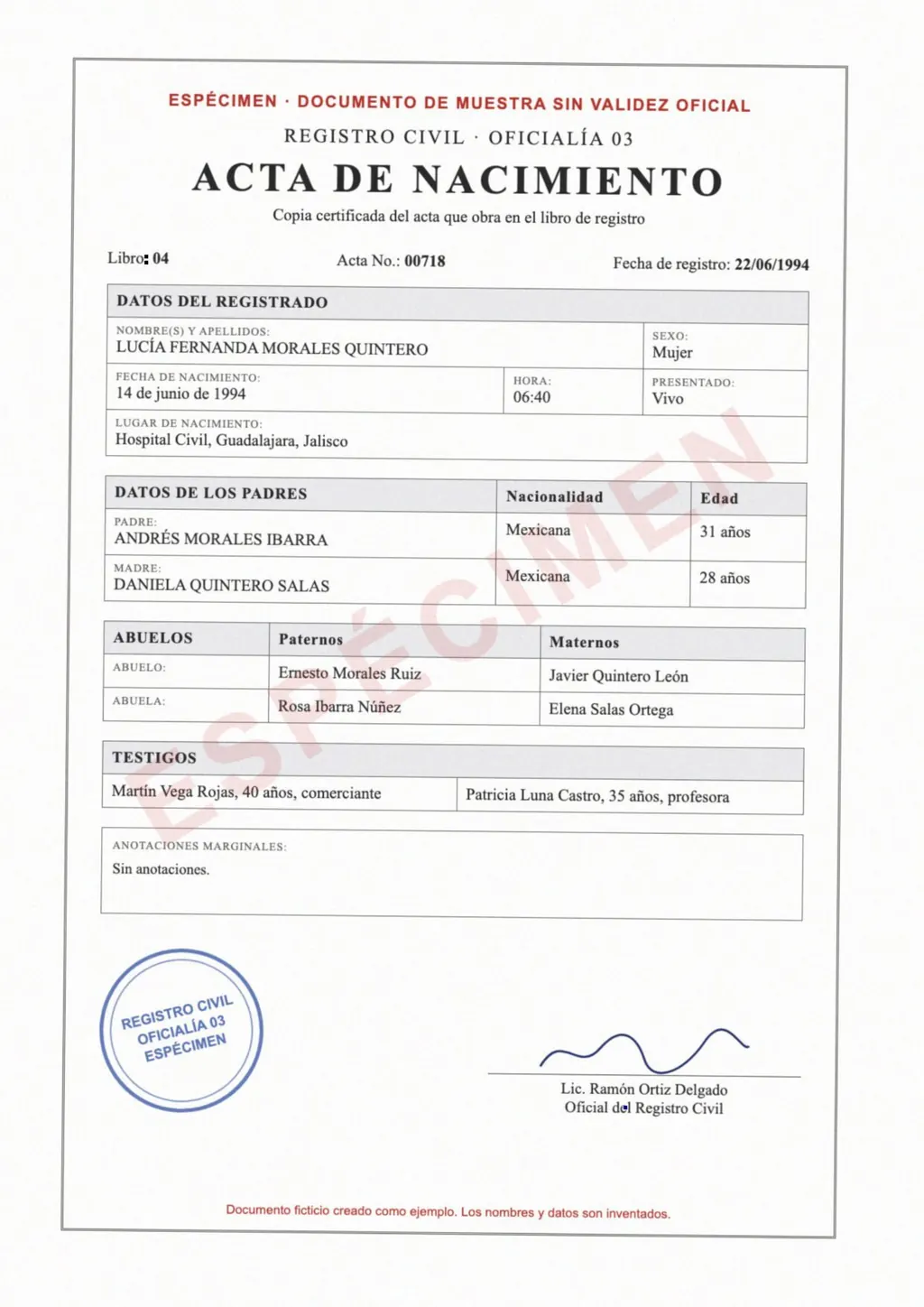
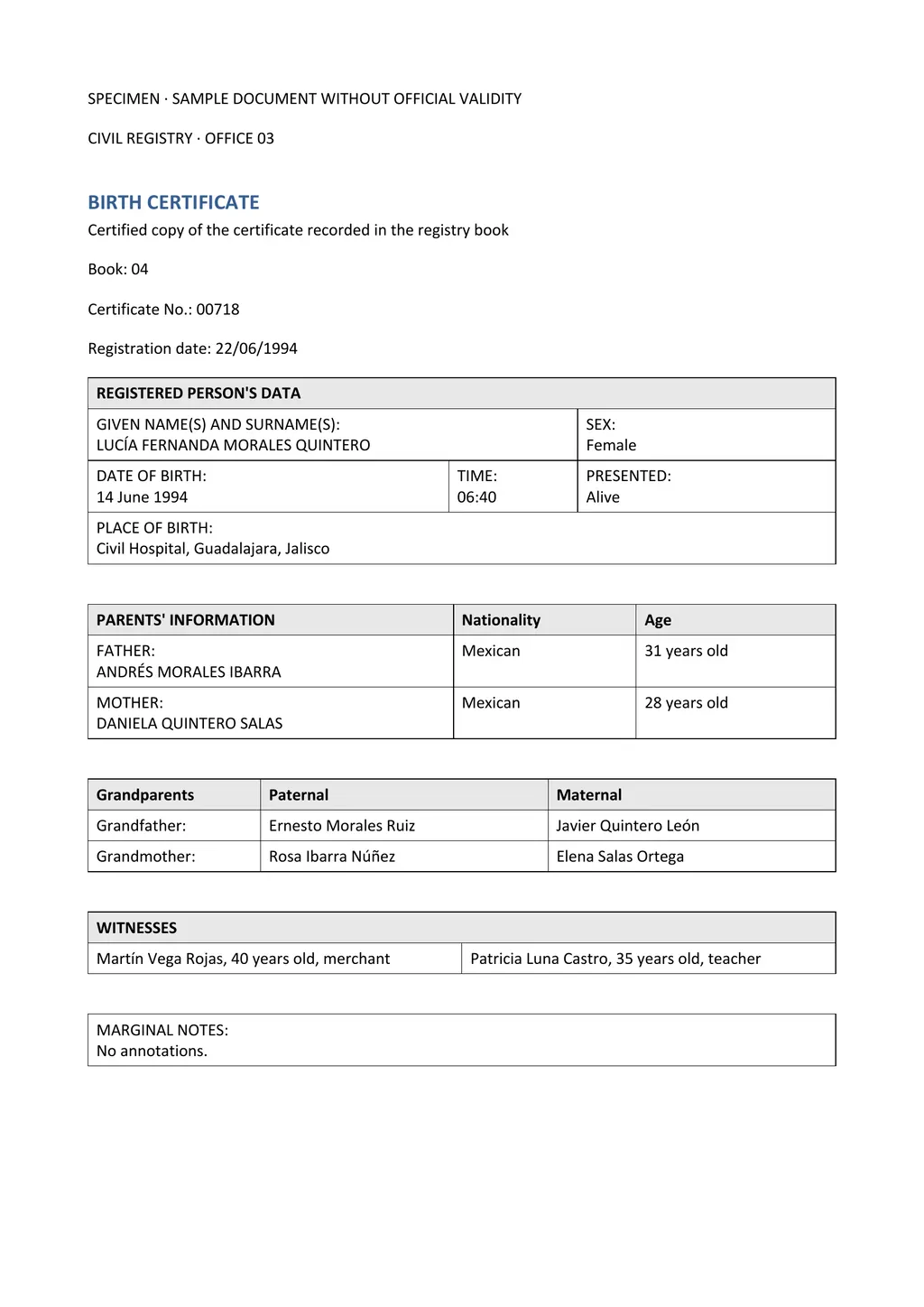
Acrobat's OCR keeps the document in its original language. A Spanish birth certificate becomes a searchable Spanish PDF. To get it in English, you would export the text and run it through a translator, then rebuild the tables by hand.
LoreAI detects the source language, translates into any of 105 languages and rebuilds the page in Word, with names in non-Latin scripts romanized. The image at the top of this page shows a scanned Spanish birth certificate and the English Word file that came back.
- For a searchable PDF in the same language, use the Acrobat online OCR tool.
- To change a few words in a scan and keep it a PDF, use Acrobat Pro's Edit tool.
- For an editable Word file in another language with the tables intact, use LoreAI.
What Adobe Acrobat OCR does well
Acrobat is the natural pick when the PDF stays a PDF. The online tool is free, works in any browser and makes every page of a long scan searchable[1]. Acrobat Pro adds batch work through Action Wizard, which runs OCR, redaction and conversion on many PDFs at once[2].
LoreAI is built for a different end result. You upload a scan or a phone photo of a certificate, transcript or letter and get back a Word file in the language you need, ready to edit, print or send.
Neither tool certifies a translation
LoreAI is not a certified translation service, and Acrobat does not translate as part of OCR. When an office such as USCIS asks for a certified translation, a translator signs a statement that the translation is complete and accurate[5]. That translator can start from LoreAI's Word file. The guide to getting a certified translation covers the steps.
Questions people ask
Is Adobe Acrobat OCR free?
How do I run OCR in Adobe Acrobat Pro?
Does Acrobat Standard include OCR editing?
Adobe's plans page lists turning scanned documents into editable, searchable PDFs under Acrobat Pro, not Standard[2].
Can Acrobat OCR translate a scanned PDF?
The OCR tool recognizes text and keeps it in the original language[1]. LoreAI reads the scan and returns it translated, as an editable Word file.
Is LoreAI free to try?
Your first document is free, up to 3 pages, and no card is needed. After that, Basic costs $12.99 a month for 200 pages.
Sources
- Adobe Acrobat: Free OCR for PDF, recognize text for a searchable PDF, accessed November 5, 2026
- Adobe Acrobat: Plans and pricing, with FAQ on Standard, Pro and Studio, accessed November 5, 2026
- Adobe Acrobat Help: Edit scanned PDFs in Acrobat, accessed November 5, 2026
- Adobe Acrobat: Convert PDF to Word for free, accessed November 5, 2026
- 8 CFR 103.2(b)(3), Translations, Cornell Legal Information Institute, accessed November 5, 2026
By Matt Mountain ·