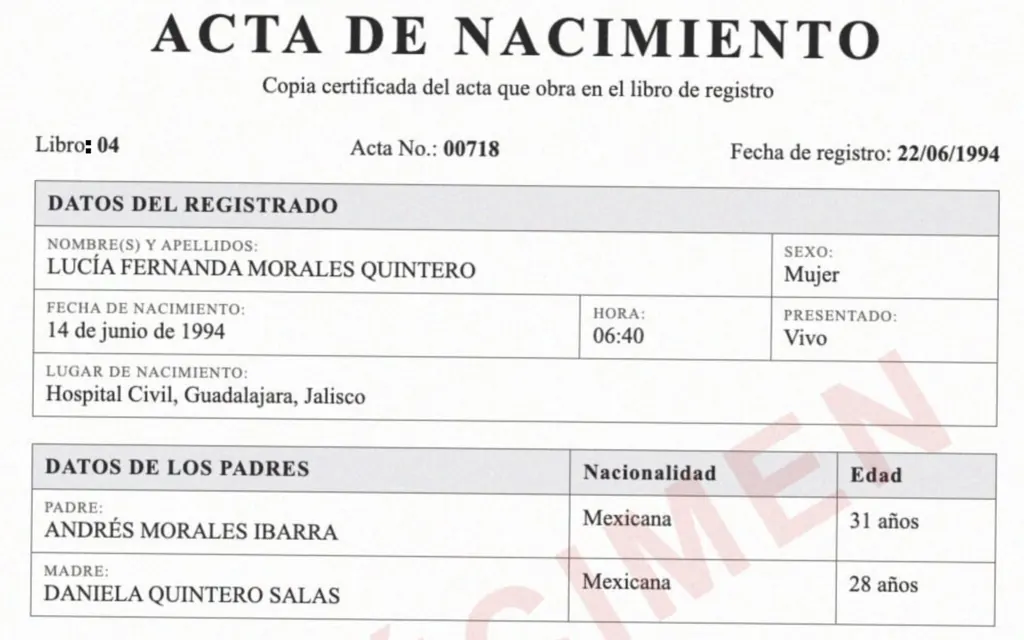
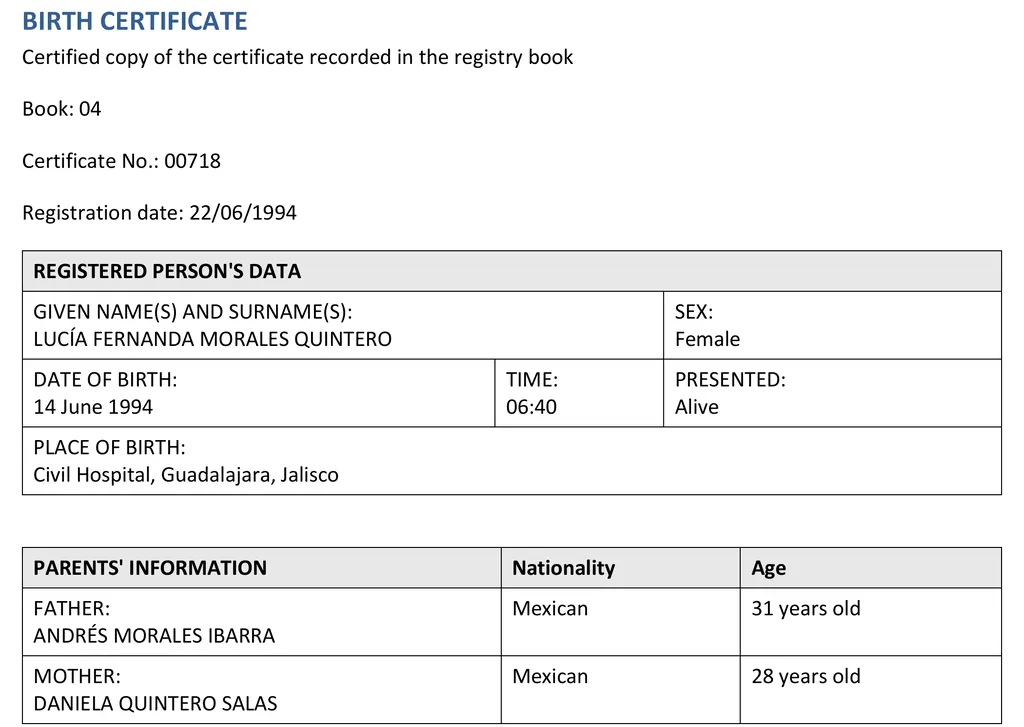
What you get
- You upload
- A PDF scan or a JPG or PNG photo of the certificate. Phone photos work if the whole page is in frame and in focus.
- You get back
- A .docx file in the language you chose, with the certificate's tables, headings and field order kept.
- Languages
- 105 target languages. LoreAI detects the certificate's language automatically.
- Time
- About 11 seconds from upload to Word file for the specimen above, in two test runs.
- Price
- Your first document is free (up to 3 pages). After that, plans start at $12.99 a month.
Names stay exactly as they are written on the certificate. LoreAI translates labels, places, dates and notes, and leaves personal names alone, which is what receivers expect.
How to translate a birth certificate with LoreAI
- Scan or photograph the whole certificate. Include the back if it has stamps, an apostille or handwritten notes, because a translation has to cover everything on the document.
- Create a free account and upload the file. Choose the certificate's language, or leave it on automatic detection, and choose the language you need.
- Download the Word file and put it next to the original.
- Check every name, date and number against the original. Fix anything the scan blurred. Add bracketed notes for things that are not text, for example [Seal: Civil Registry, Office 03] or [Signature]. LoreAI does not always carry stamp text over.
- Add a translator's certification at the end if your receiver asks for one. The certificate of translation template has wording you can copy.
- Print or save the translation and submit it with a copy of the original certificate.
What receivers expect
USCIS sets its rule in federal regulation 8 CFR 103.2(b)(3). A foreign-language document has to come with a full English translation, and the translator has to certify that the translation is complete and accurate and that they are competent to translate from that language into English. The USCIS translation guide quotes the rule and explains what that statement contains.
Schools, employers, banks and state agencies set their own rules. Some accept a translation signed by any competent translator. Others want a professional translator, a notarized signature or a translation made in a specific country. Check the receiver's instructions before you start, because the wording of the certification depends on them.
What LoreAI does not do
- LoreAI does not certify, swear or notarize translations. It writes the translation. A person signs the certification.
- It does not check whether a certificate is genuine or current.
- It cannot promise that a receiver will accept the translation. The receiver decides.
- It can misread faded stamps, handwriting and very low-resolution photos. That is why the check in step 4 matters.
If your receiver requires a sworn or court-certified translator, for example for some foreign governments or courts, use one. You can still hand them the Word file as a draft, but the translator signs and answers for the result.
Guides for your language and receiver
- Spanish to English birth certificate translation, with the terms used on Mexican and Central American certificates
- English to Spanish, for US certificates used in Spanish-speaking countries
- Birth certificates for USCIS, step by step
- Getting a translation certified or notarized
- Birth certificate translation template in Word
Questions people ask
Can I translate my own birth certificate?
Anyone can translate a certificate with LoreAI. Whether you may sign the certification yourself depends on the receiver. The USCIS rule asks for a translator who certifies competence and accuracy and does not say who that person must be. Other receivers are stricter. WES, for example, does not accept translations completed by applicants. If you can, have someone other than the applicant check and sign.
Does a birth certificate translation need to be notarized?
The USCIS regulation and the I-130 and I-485 form instructions do not mention notarization. Some other receivers do ask for it. A notary confirms who signed the statement and does not check the translation.
How long does it take?
Usually under a minute for a one-page certificate. The specimen on this page took about 11 seconds. Checking the result against the original takes you a few more minutes.
What does it cost?
Your first document is free, up to 3 pages. After that, Basic costs $12.99 a month for 200 pages and Pro costs $39.99 a month for 1,000 pages.
Will LoreAI change the names on my certificate?
No. LoreAI keeps personal names as written, including both surnames and accents. Check them anyway, since a blurred scan can drop an accent.
Is my certificate stored?
Not unless you ask for it. LoreAI deletes the upload right after reading it, and the results automatically, normally within an hour and in any case within 24 hours (see the privacy policy). If you turn on Keep my translated documents in Settings, the translation and the Word file are kept until you delete them; the upload itself never is.