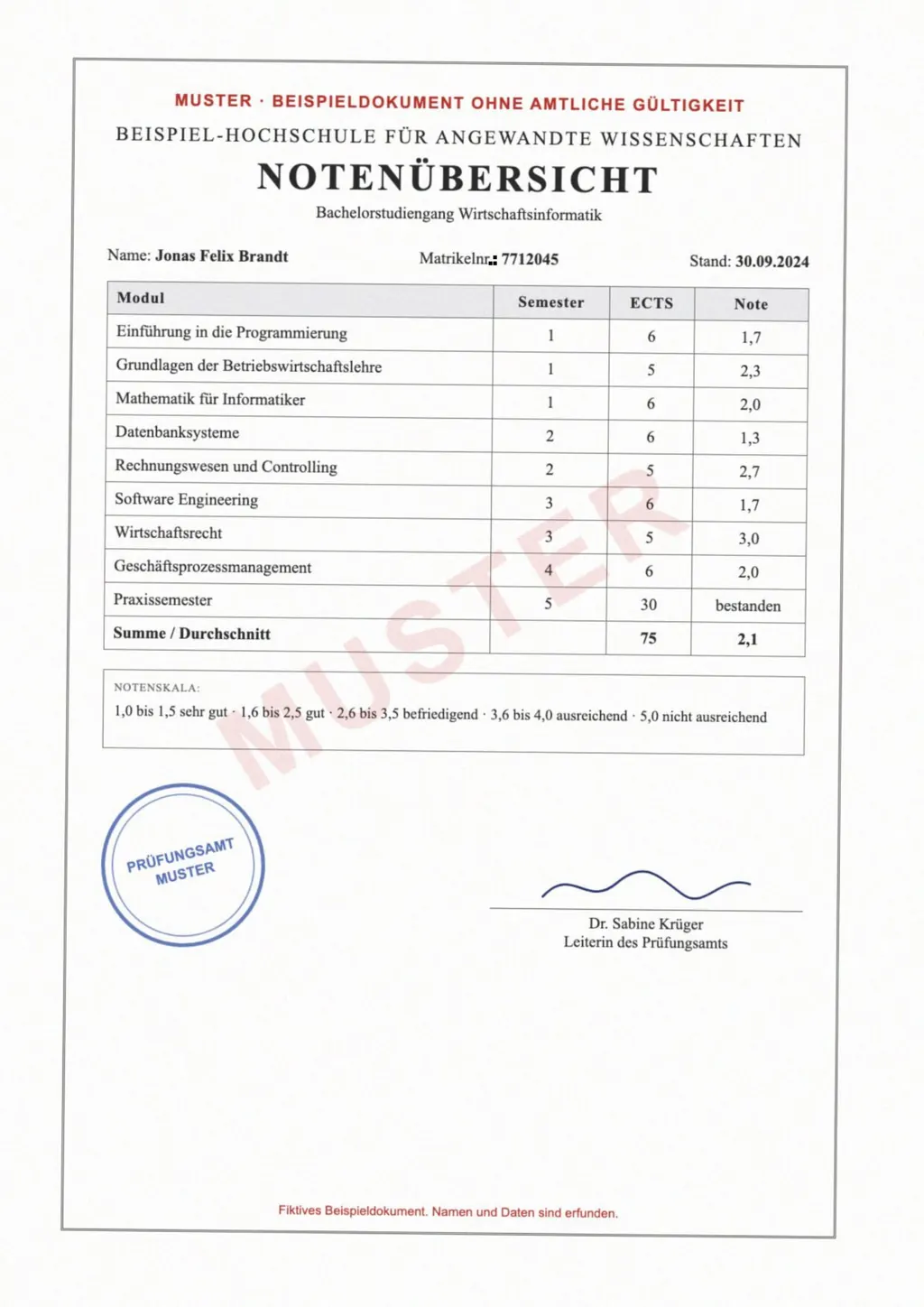
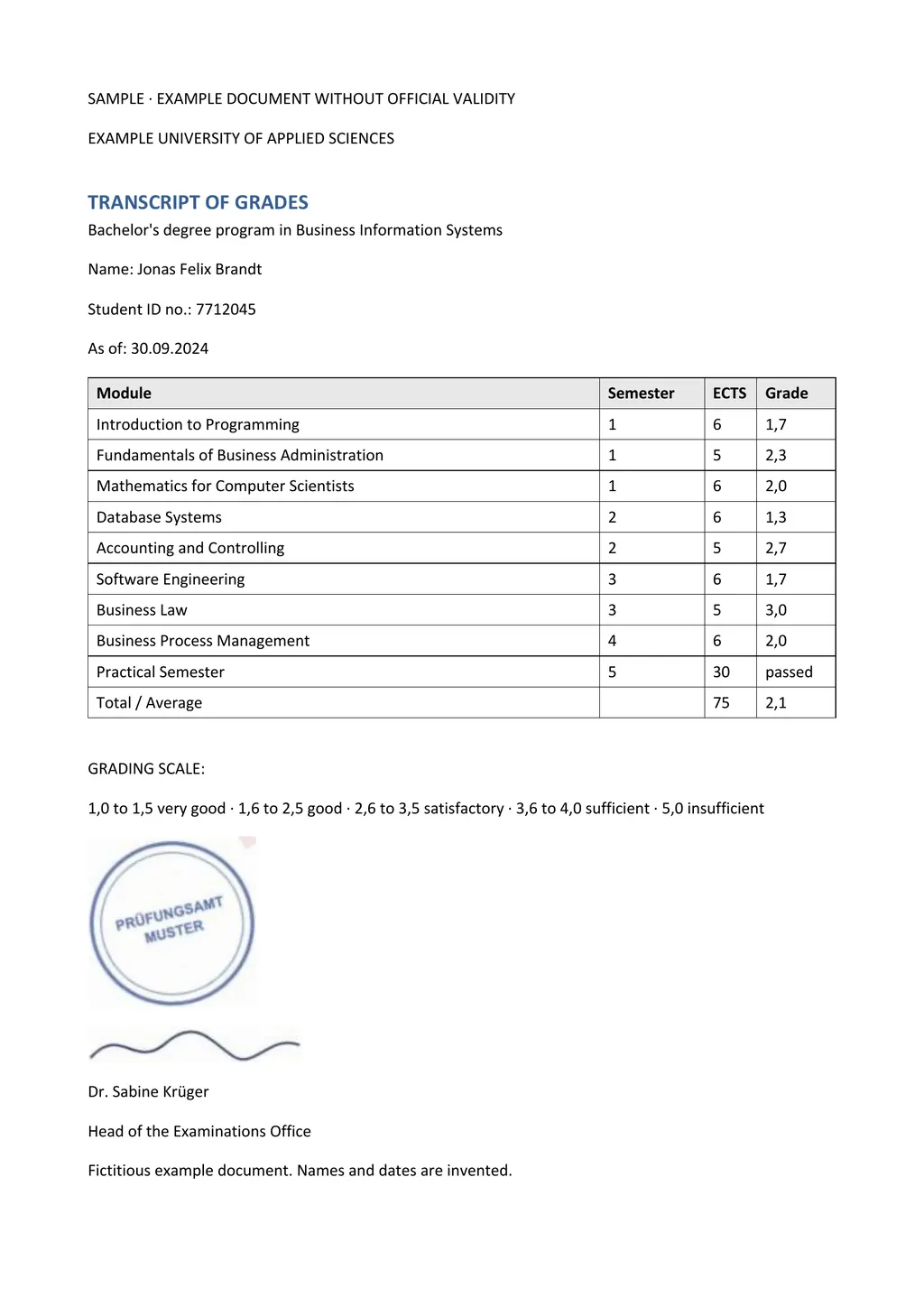
What OCR means
OCR stands for optical character recognition. Cornell University Library describes OCR software as examining a scanned image or document for text and creating a text-readable digital copy, often a PDF, a Word document or an Excel sheet[2]. It turns a picture of letters into letters a computer can work with.
In a PDF, OCR usually leaves the page image as it was and adds an invisible text layer on top of it. The page looks the same, but you can now highlight a word, search for it and paste it somewhere else. That kind of file is what people mean by an OCR PDF or a searchable PDF.
Three kinds of PDF
- Digital PDF
- Saved from Word, a browser or an app. The text was there from the start, so no OCR is needed.
- Scanned PDF
- Made by a copier or a phone scanning app. Every page is a photo, and the file contains no text at all.
- OCR PDF
- A scanned PDF after OCR. The photo stays, and a text layer sits behind it for searching and copying.
The difference matters when you want to edit, search or translate the file. A tool that reads the text layer finds nothing in a plain scan. Google's help page says text in images and scanned PDF pages shows up in the output document but is not translated[1].
How to tell whether your PDF has been OCR'd
- Try to select one word with the cursor. If only that word highlights, the PDF has text. If the whole page turns blue, or nothing happens, it is a scan without OCR.
- Press Ctrl+F, or Cmd+F on a Mac, and search for a word you can see on the page. No match means no text layer.
- Copy a line and paste it into a note. Garbled characters mean the OCR was poor or the text layer is broken.
Why OCR results differ
Microsoft's Word help says the accuracy of text recognition depends on the quality of the scan and on the clarity of the scanned text[3]. Cornell's guide says the same about the original document and the scans[2]. A sharp, straight scan gives any OCR engine a better start.
- Scan at 300 dpi for normal print and higher for small print.
- Lay the page flat and photograph it straight on, without shadows or glare.
- Crop away the desk or table around the page.
- Keep the whole page in the frame, stamps and margin notes included.
OCR PDF or editable Word file?
An OCR PDF is good for searching an archive or copying a sentence. Editing it is hard, because the visible page is still a picture. If you need to change the text, fill in a form, or hand the document to a translator, a Word file is easier to work with.
LoreAI reads the scan and rebuilds the page as a Word document with headings, lists and tables in the original order. Tables become real Word tables, not text pasted into lines. The scanned PDF to Word converter does this for one page for free.
How to OCR a scanned PDF with LoreAI
- Try the free tool on one page. The PDF to text tool reads the first page of a PDF up to 5 MB and shows the recognized text.
- Create a free account for the whole file. Your first document is free, up to 3 pages and 3 MB.
- Upload the scanned PDF. Scans, phone photos saved as PDF, and JPG or PNG images all work.
- Pick a language, or keep the original. LoreAI can translate the text into 105 languages in the same step, with the source language detected automatically.
- Download the Word file. Open the .docx in Word, Google Docs or LibreOffice and edit it like any other document.
OCR and translation
Most free document translators work on the text layer. Google Translate's document tab takes files up to 10 MB, and PDFs of up to 300 pages[1], but text in scanned pages comes back untranslated[1]. An OCR translator reads the scan first and then translates it. LoreAI does both, so a scanned certificate, transcript or letter comes back as a translated Word file. The scanned PDF translation guide walks through it.
Questions people ask
Is an OCR PDF the same as a searchable PDF?
Yes, in everyday use. Both mean a scanned PDF with a text layer added by OCR, so you can search and copy its words.
Does OCR change how my PDF looks?
An OCR PDF usually keeps the page image unchanged and adds hidden text behind it. Converting the scan to Word instead rebuilds the page as editable text.
What does OCR mean on a scanner or printer?
The same thing: the device or its software recognizes the letters in the scan so the file contains text, not only a picture.
Can OCR read tables?
LoreAI does. It rebuilds tables in a scan as Word tables, with the rows and columns of the original.
Sources
- Google Translate Help: Translate documents and websites (computer), accessed November 4, 2026
- Cornell University Library: Zotero at Cornell, Optical Character Recognition (OCR), accessed November 4, 2026
- Microsoft Support: Insert scanned text or images into Word, accessed November 4, 2026
By Matt Mountain ·