The ranking at a glance
- DeepL. The widest file support and a free tier, best for typed Office files[1].
- Google Translate. Free with no account, best for a typed PDF you only need to read[2].
- LoreAI. Best for scans, phone photos and forms you need back as an editable Word file.
- Microsoft Word. Best if you already pay for Microsoft 365 and your file is a Word document[3].
- RushTranslate. A human service, best when the receiver wants a certified translation[4].
Prices and limits below come from each vendor's own page, opened on November 2, 2026. We ranked on what each tool's documentation says it does. We did not run the same file through all five, and we did not rank on translation quality, which changes with the language pair.
1. DeepL
- Verdict
- The strongest all-round tool for typed documents in common office formats[1].
- Best for
- Word, PowerPoint, Excel, HTML, SRT and TXT files as well as PDFs, into over 100 languages[1].
- Price
- Free version with 1 file a month up to 5 MB. Individual plan €7.49 a month billed annually, with 3 files a month up to 30 MB. The page we opened showed prices for Germany, and DeepL sets prices by country[5].
- Does badly
- Its PDF page says PDF translation relies on OCR and may have a higher error rate, and for scanned PDFs it points you to the desktop and mobile apps, which return the text extracted from the file[6].
- Source
- DeepL Pro pricing and DeepL document translation pages[5]
A .docx download of a translated PDF is listed among the Pro features[6]. On the free version, one file a month runs out fast if you have a stack of paperwork.
2. Google Translate
- Verdict
- The best free option for a typed document, as long as it is not a scan[2].
- Best for
- A .docx, .pdf, .pptx or .xlsx file up to 10 MB, or a PDF of up to 300 pages[2].
- Price
- Free on the website, no plan to pick, checked November 2, 2026.
- Does badly
- Text in images and scanned PDF pages shows up in the output but is not translated, and document translation is not available on phones[2].
- Source
- Google Translate Help, Translate documents and websites[2]
Our page on Google Translate and scanned PDFs shows what happened when we uploaded a scanned birth certificate.
3. LoreAI
- Verdict
- The tool on this list built for scans and photos of paperwork, and nothing else.
- Best for
- Scanned PDFs and JPG or PNG photos of certificates, transcripts and forms that you need to correct and hand in.
- Price
- First document free, up to 3 pages and 3 MB. Basic costs $12.99 a month for 200 pages.
- Does badly
- It takes only PDF, JPG and PNG, so a Word file, slide deck or spreadsheet needs one of the tools above. After the first document there is no free tier.
- Source
- Our own plans. The numbers here update when the prices change.
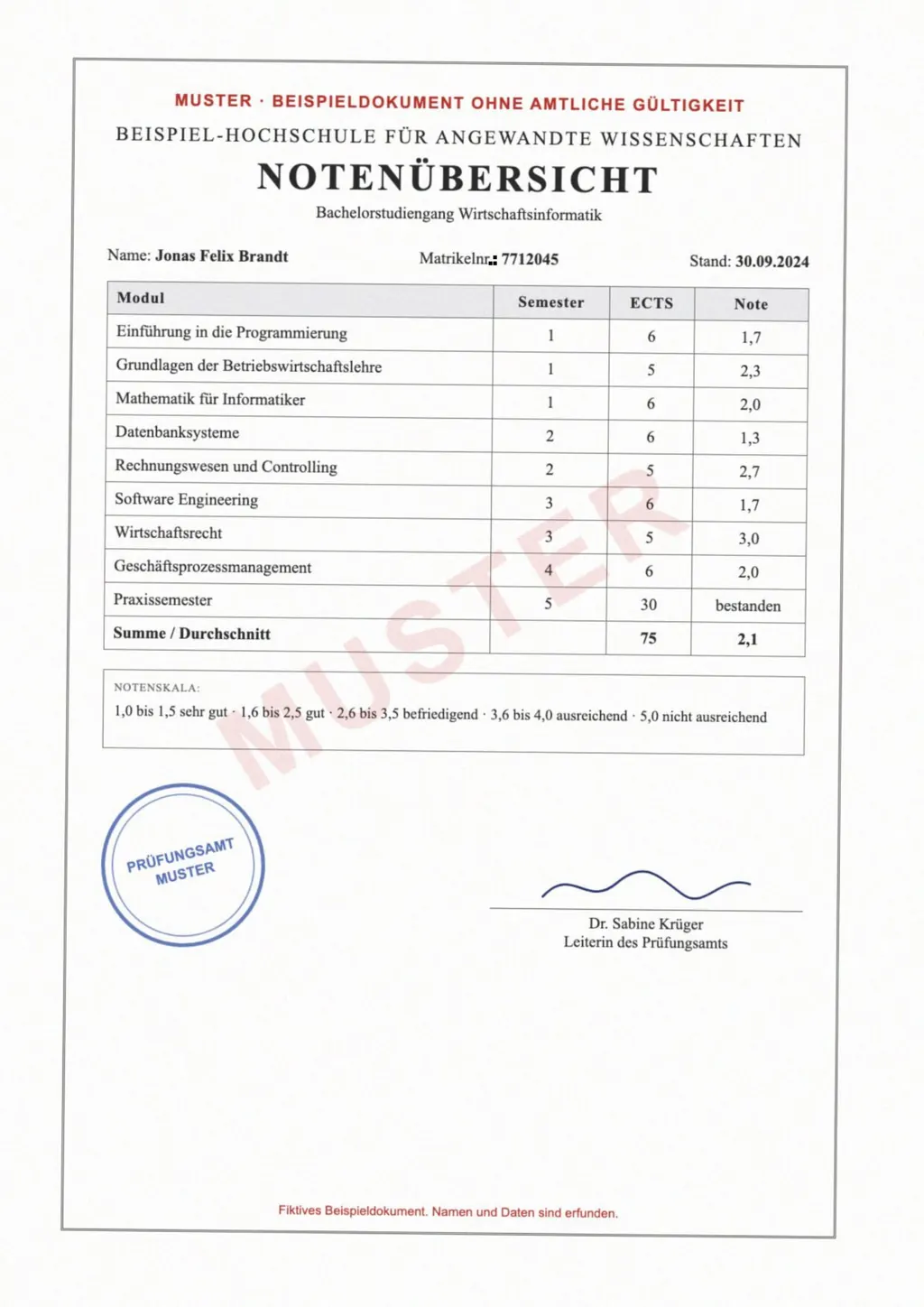
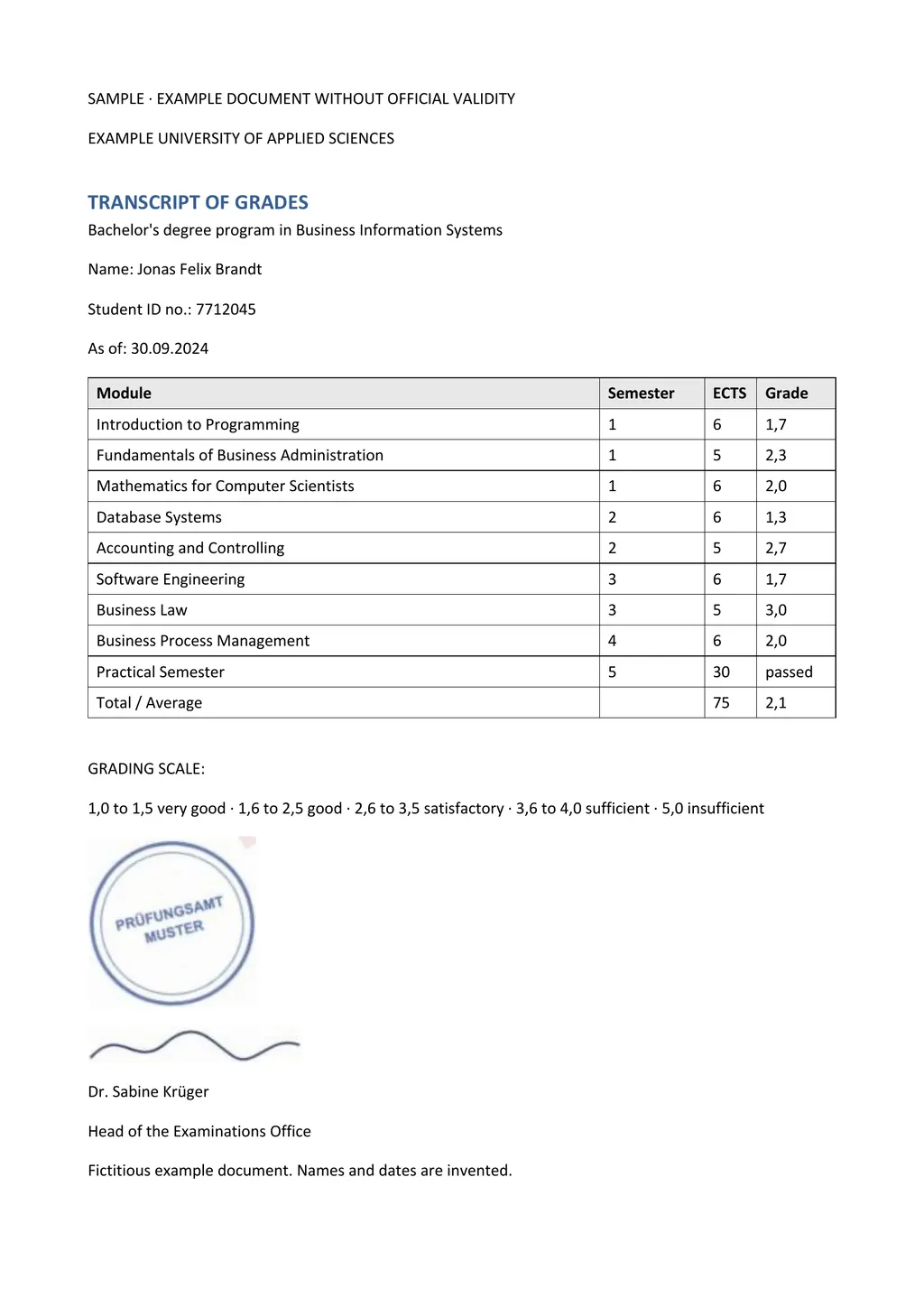
LoreAI reads the page with OCR, detects the source language and translates into 105 languages. You get an editable Word file with headings, lists and tables in the original order, and names, dates and numbers stay as written. The image above shows a German transcript and the Word file it returned.
4. Microsoft Word
- Verdict
- Convenient if you already have the subscription, since the translated copy opens as a new Word document[3].
- Best for
- Translating a whole Word document from Review, then Translate, then Translate Document[3].
- Price
- Needs Microsoft 365 or Office 2021[3]. Microsoft 365 Personal costs $9.99 a month or $99.99 a year[7].
- Does badly
- Whole file translation is a Word feature, and the help page says nothing about scanned images or PDFs. You need an internet connection and connected experiences turned on[3].
- Source
- Microsoft Support, Translate text into a different language[3]
5. RushTranslate, when it has to be certified
- Verdict
- Not a machine translator. A human service for documents an office will check[8].
- Best for
- Birth certificates, diplomas and other papers for USCIS or a university, with a signed certificate of accuracy[8].
- Price
- $24.95 a page for certified translation, where a page is 250 words or less, and $0.10 a word for standard translation[4].
- Does badly
- It applies basic formatting and does not copy the design of your original[8]. Turnaround starts at 24 hours for 1 to 3 pages, so it is slower than any tool above[8].
- Source
- RushTranslate pricing and certified translation pages[4]
Side by side
| What you need | DeepL | Google Translate | LoreAI | Microsoft Word |
|---|---|---|---|---|
| File types | PDF, Word, PowerPoint, Excel, HTML, SRT, TXT[1] | .docx, .pdf, .pptx, .xlsx[2] | PDF, JPG and PNG | Word documents[3] |
| File size | Free 5 MB, Individual 30 MB, Business 100 MB[5] | Up to 10 MB[2] | Free 3 MB, Basic 10 MB, Pro 25 MB | Not stated on the help page |
| PDF length | Not stated on the pages we opened | Up to 300 pages[2] | Free 3, Basic 30, Pro 100 pages | Not a PDF tool |
| Scanned pages | Desktop and mobile apps translate the extracted text[6] | Not translated[2] | Read with OCR, then translated | Not covered by the help page |
| Photos of documents | BMP, PNG, JPG, TIFF and GIF in the apps[9] | Separate Images tab[10] | JPG or PNG upload | No |
| What you download | Translated file, .pdf or .docx for PDFs on Pro[6] | Translated file | Editable Word file (.docx) | A translated copy in Word[3] |
| On a phone | Mobile apps[6] | Not available for documents[2] | Works in a phone browser | Not covered here |
| Price | Free tier, paid from €7.49 a month in Germany[5] | Free | First document free, then $12.99 a month | Microsoft 365 from $9.99 a month[7] |
Which one should you pick?
- Google Translate, for a typed PDF you only need to read and don't want to pay for[2].
- DeepL, for slides, spreadsheets or many typed files a month, on a paid plan once you pass 1 file a month[5].
- LoreAI, for a scan, a phone photo or a form you need to correct before you send it.
- Word's own Translate Document, for a Word file when you already pay for Microsoft 365[3].
- A certified translation from a person, such as RushTranslate, for a document going to USCIS, a court or a university[8].
None of the machine tools certifies a translation
DeepL, Google Translate, Microsoft Word and LoreAI all produce machine translations. For USCIS, a foreign language document needs a full English translation that the translator has certified as complete and accurate, plus the translator's statement that they are competent to translate[11]. A tool cannot sign that statement. LoreAI is not a certified translation service.
The guide to getting a certified translation explains who can sign one and what it must say.
Questions people ask
What is the best free document translator?
What is the best app to translate documents on a phone?
Which document translator keeps the layout?
Is an AI document translator good enough for official papers?
Not on its own. For USCIS the translation needs a signed certification from a competent translator[11]. Use a machine translation to understand the document, then have a person certify the version you send.
Sources
- DeepL: Document translation, accessed November 2, 2026
- Google Translate Help: Translate documents and websites (computer), accessed November 2, 2026
- Microsoft Support: Translate text into a different language, accessed November 2, 2026
- RushTranslate: Translation pricing, accessed November 2, 2026
- DeepL Pro: Plans and pricing, accessed November 2, 2026
- DeepL: Translate PDF documents, accessed November 2, 2026
- Microsoft: Compare all Microsoft 365 plans, accessed November 2, 2026
- RushTranslate: Certified translation services, accessed November 2, 2026
- DeepL: Translate images, accessed November 2, 2026
- Google Translate Help: Translate images (computer), accessed November 2, 2026
- 8 CFR 103.2(b)(3), Translations, Legal Information Institute, Cornell Law School, accessed November 2, 2026
By Matt Mountain ·