The ranking at a glance
- Google Translate. Free on the web and in the app, best for signs, menus and screenshots[1].
- Apple Translate. Best on an iPhone, with live translation in the camera view[2].
- DeepL. Best on a computer, where it can translate a screen capture[3].
- LoreAI. Best for a photo of a document you need back as an editable Word file.
- Kapwing. Best for graphics, memes and flyers where the translated text has to sit in the design[4].
Each entry comes from the vendor's own help, feature or pricing page, opened on November 2, 2026. We ranked on what each page says the tool does and costs. We did not run the same photo through all five.
1. Google Translate
- Verdict
- Free on the web, Android and iPhone, and enough for most photos with text in them[5].
- Best for
- Pointing the phone camera at a sign or note, or uploading a picture to the Images tab on the website[5].
- Price
- Free, no plan to pick, checked November 2, 2026.
- Does badly
- Google says accuracy drops with small, unclear or stylized text[1]. You get a translated image or copied text, not an editable document.
- Source
- Google Translate Help, Translate images[1]
On Android, you can download languages and use camera translation offline[5]. On the website you can download the translated image or copy the text[1].
2. Apple Translate
- Verdict
- The quickest option if you have an iPhone, because text is translated as you move the camera[2].
- Best for
- A restaurant menu, a street sign or a photo already in your library[2].
- Price
- It is an app on the iPhone. Apple's guide, checked November 2, 2026, lists no price[2].
- Does badly
- It works only in supported languages[2]. The guide we opened is for iPhone, so it is no help on Android or Windows.
- Source
- Apple Support, Use the camera in the Translate app on iPhone[2]
You can freeze the image, tap an overlaid translation to copy or play it, and share or save a translated photo[2].
3. DeepL
- Verdict
- Strong on a computer, with screen capture in the Windows and Mac apps and a camera button in the mobile apps[3].
- Best for
- Screenshots of websites and documents, and BMP, PNG, JPG, TIFF or GIF files[3].
- Price
- Free plan limited to 1,500 characters a day of image translation[3]. Paid plans start at €7.49 a month billed annually on the page we opened, which showed prices for Germany[6].
- Does badly
- DeepL says handwritten text is difficult and may not translate accurately[3]. Screen capture reads 14 source languages on Windows and 9 on Mac[3].
- Source
- DeepL, Translate images[3]
4. LoreAI
- Verdict
- Not a camera app. It turns a photo of paperwork into a Word file you can edit.
- Best for
- Phone photos of birth certificates, licenses, transcripts and forms that you need to correct, print or send.
- Price
- First document free, up to 3 pages. Basic costs $12.99 a month for 200 pages.
- Does badly
- There is no live camera view, and it takes only JPG, PNG and PDF files. For a menu or a street sign, one of the free apps above is faster.
- Source
- Our own plans. The numbers here update when the prices change.
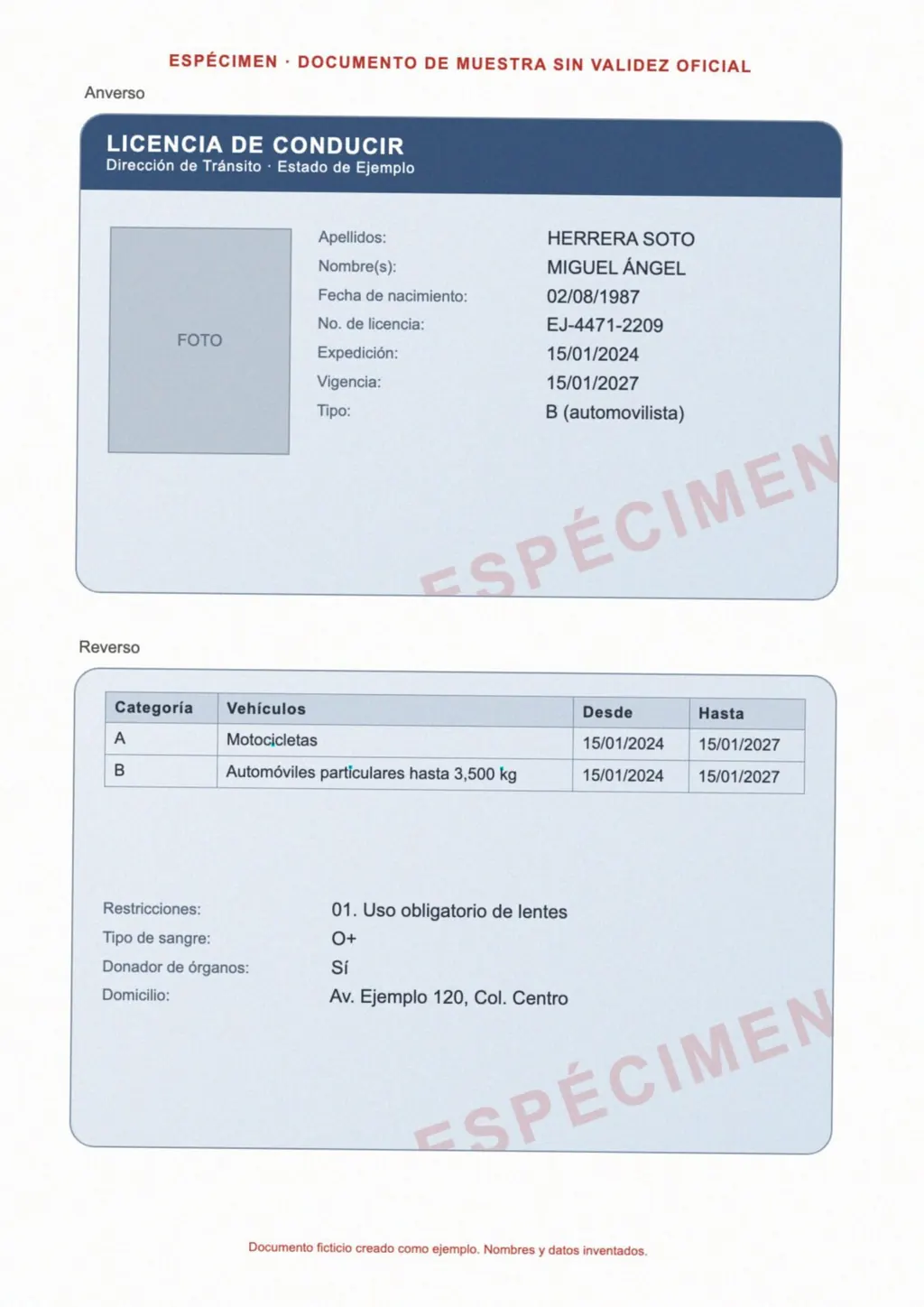
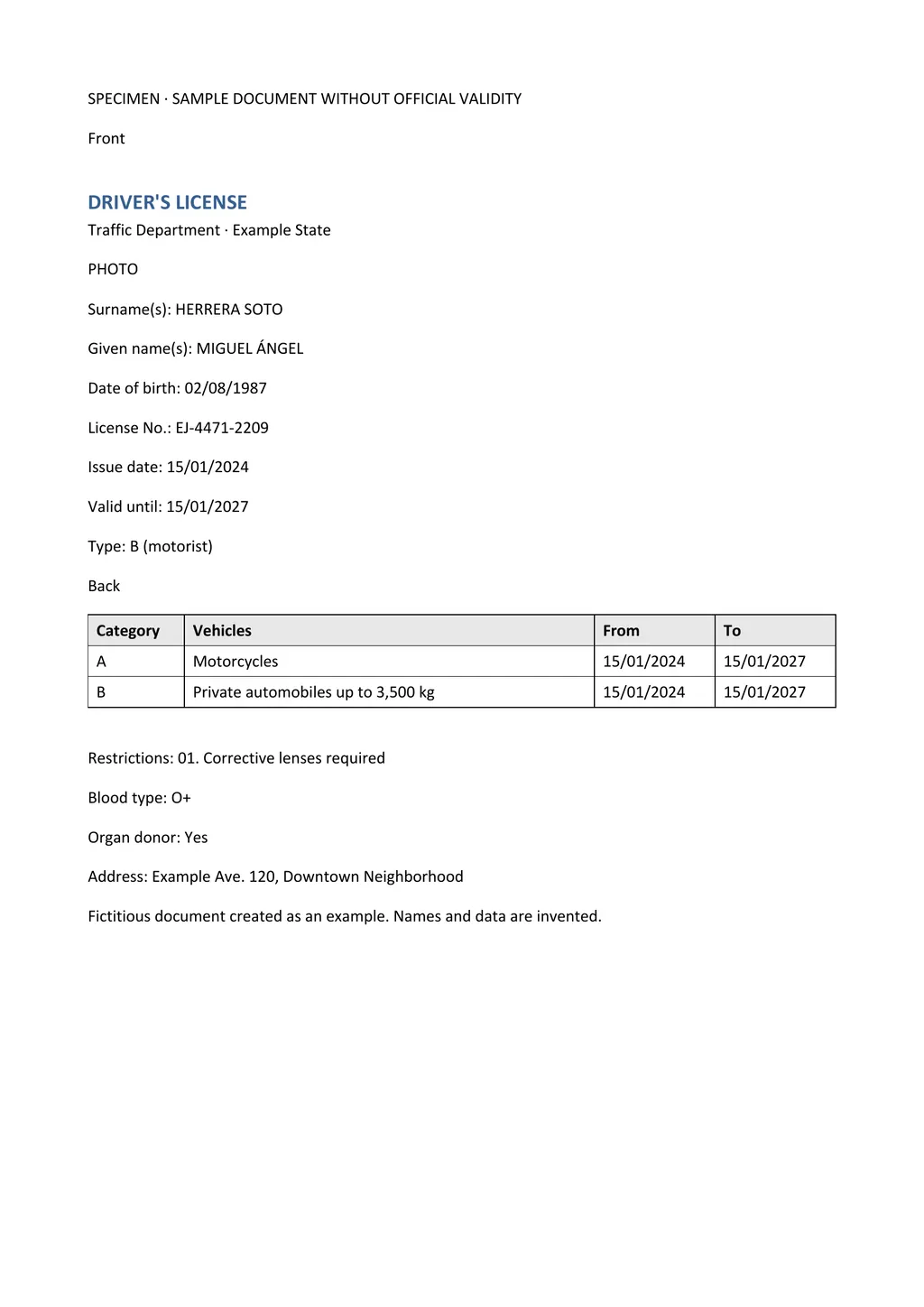
LoreAI reads the photo with OCR, detects the source language and translates into 105 languages. The Word file keeps headings, lists and tables in the original order, so a form stays a form. The image at the top of this page shows a photographed license and the file it returned.
5. Kapwing
- Verdict
- An online design editor, useful when the translated words have to replace the original ones inside a graphic[4].
- Best for
- Memes, flyers, menus and infographics, translated into 75+ languages, with font, color and position you can change[4].
- Price
- Free, and every free export carries a small watermark[4]. The Pro plan shows $16 on the pricing page, which offers monthly and annual billing without labeling which one that figure is[7].
- Does badly
- It is built for visuals, so you get an image back, not a document you can edit as text. Removing the watermark needs a paid plan[7].
- Source
- Kapwing, Image Translator and Pricing[4]
Side by side
| What you need | Google Translate | Apple Translate | DeepL | LoreAI | Kapwing |
|---|---|---|---|---|---|
| Live camera | Yes, in the app[5] | Yes[2] | Camera button in mobile apps[3] | No | No |
| File types | Images tab on the website[1] | Photos in your library[2] | BMP, PNG, JPG, TIFF, GIF[3] | JPG, PNG and PDF | JPG, PNG, WebP, HEIC and more[4] |
| What you get | Translated image or copied text[1] | Overlay, saved or shared image[2] | Translated text[3] | Editable Word file (.docx) | Edited image with text overlays[4] |
| Offline | Android, after downloading languages[5] | Not stated in the guide | Not stated | No | No |
| Price | Free | No price listed[2] | 1,500 characters a day free[3] | First document free, then $12.99 a month | Free with watermark[4] |
Which one fits your photo?
- Google Translate or Apple Translate, for a sign, menu or label you want to read now[5].
- DeepL, for a screenshot on your computer[3].
- LoreAI, for a certificate, license or form you need as a document.
- Kapwing, for a graphic you will post or print in another language[4].
If your phone saves photos as HEIC, check the file type before you upload. Our guide to translating an image to English covers that step.
A photo translation is not a certified translation
Every app here produces a machine translation. For USCIS, a foreign language document needs a full English translation certified as complete and accurate by a translator who also states they are competent to translate[8]. LoreAI is not a certified translation service. The guide to getting a certified translation walks through the steps.
Questions people ask
What is the best free image translator?
What is the best camera translator app for iPhone?
Can an image translator handle handwriting?
Sources
- Google Translate Help: Translate images (computer), accessed November 2, 2026
- Apple Support: Use the camera in the Translate app on iPhone, accessed November 2, 2026
- DeepL: Translate images, accessed November 2, 2026
- Kapwing: Image Translator, accessed November 2, 2026
- Google Translate Help: Translate images (Android phone and tablet), accessed November 2, 2026
- DeepL Pro: Plans and pricing, accessed November 2, 2026
- Kapwing: Pricing, accessed November 2, 2026
- 8 CFR 103.2(b)(3), Translations, Legal Information Institute, Cornell Law School, accessed November 2, 2026
- Google Translate Help: Translate images (iPhone and iPad), accessed November 2, 2026
By Matt Mountain ·